Bihar Voter Card Download 2025
Citizens of Bihar can download their Voter card online without going anywhere. Online electronic voter card, also known as E-roll, is available to download in PDF for Bihar state.
The Election Commission of Bihar published all valid voter cards online (E-roll) for people to download and use. Please follow the steps below to download the voter card for Bihar:
Download Voter Card Bihar 2025
Using the official Bihar voter website, there were 3 methods of searching for voter cards and downloading them online on a single page.
Method 1: Search by EPIC Number
Method 2: Search by Name
Method 3: Search by Mobile Number
Let's know the complete process of how to download the Bihar voter card:
Bihar Voter Card Search by EPIC Number 2025
Step 1. Go to the official website of Bihar Voter Card: https://electoralsearch.eci.gov.in/. The Search in Electoral Roll Webpage will open on the screen.
Step 2. Now click on the first option, ईपीआईसी द्वारा खोजें / Search by EPIC (for the first time it is set by default). In this section, use the EPIC number search and download the voter card PDF.
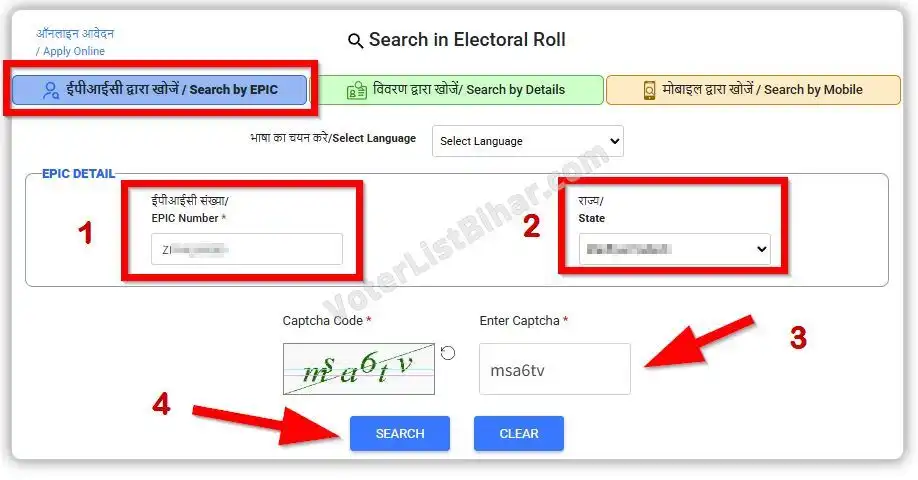
Now select choose language you want (भाषा का चयन करे/Select Language) After the Enter Valid EPIC Numbe (ईपीआईसी संख्या/ EPIC Number), Now select your State (राज्य/State), and last fill the Captcha Code. After giving all details, press the “Search” button.
Step 3. Here, the search result list will show at the bottom with the name, age, address, and other details of the EPIC number. In the last “Action” column, click on the “View Details” link to display complete details.
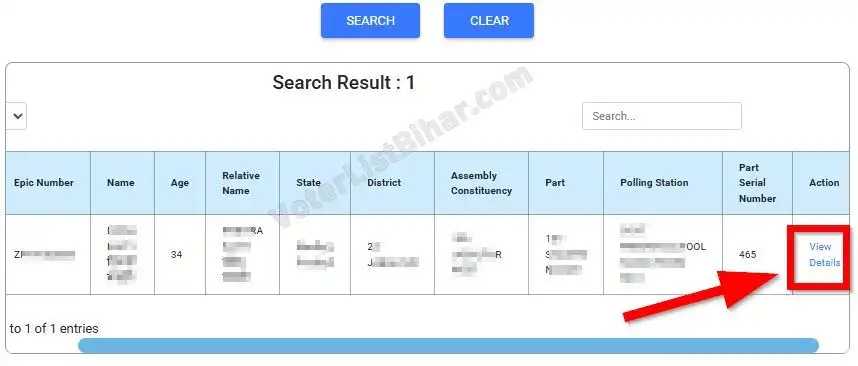
Step 4. The complete Electoral Roll will open with details of Polling Station, Part number and name, part serial number, polling date, and details of the election officers for that EPIC number.
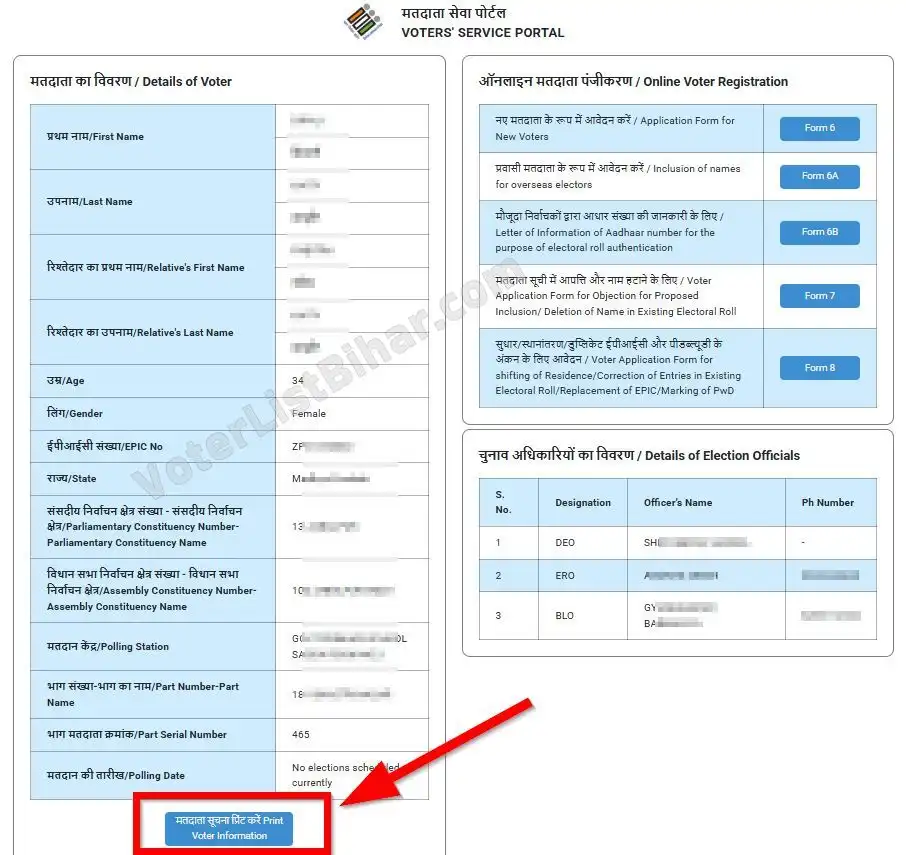
Step 5. To download E-Voter Card (E-Roll) click on the “Print Voter Information/मतदाता सूचना प्रिंट करें” button on the bottom, It will generate a PDF E-Voter Card for entered EPIC number.
After clicking on this button, a PDF file will download to the device. It's a valid e-voter card, also useful for voting and knowing all information about the EPIC’s polling.
Bihar Voter Card Search by Name 2025
Step 1. Go to the official website of Bihar Voter Card: https://electoralsearch.eci.gov.in/.
Step 2. On this page click on the 2nd option “विवरण द्वारा खोजें/ Search by Details”. Now select some details to get List of voter cards:
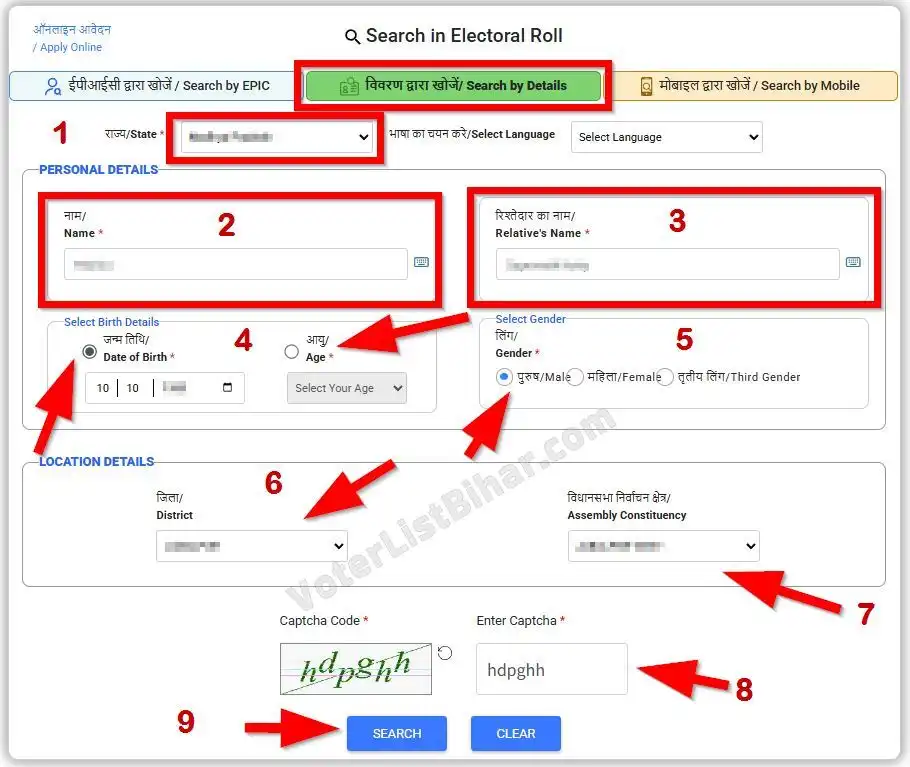
- राज्य/State
- भाषा का चयन करे/Select Language
- नाम/Name
- रिश्तेदार का नाम/Relative's Name
- जन्म तिथि/Date of Birth
- आयु/Age
- लिंग/Gender
- जिला/District
- विधानसभा निर्वाचन क्षेत्र/Assembly Constituency
And last, enter the “Captcha code” and press the “Search” button.
Step 3. Here, the voter list will display at the bottom. Click on the “View Details” to expand the Voter Roll details.
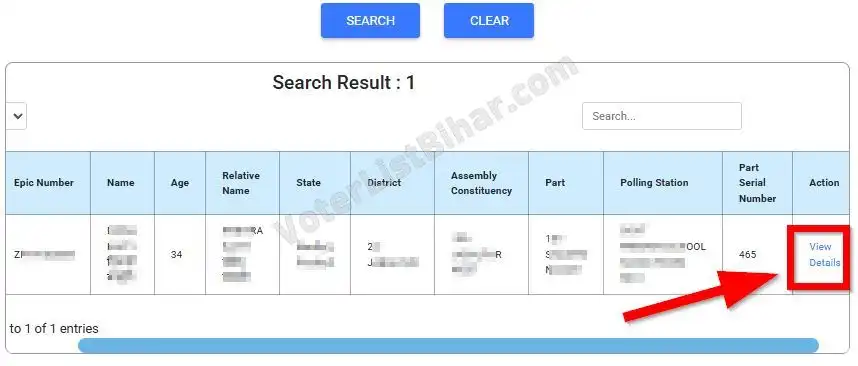
Step 4. Now, as same above, the complete voter details will open with details of Polling Station, Part number and name, part serial number, polling date, and details of the election officers for that EPIC number.
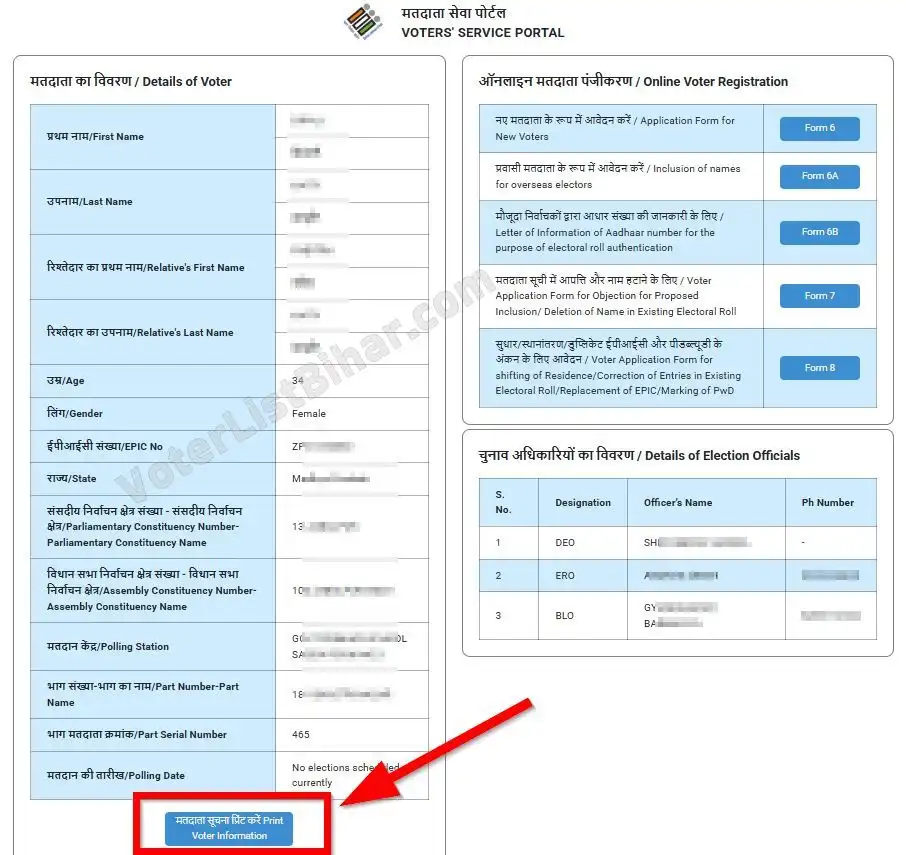
Step 5. To download E-Voter Card (E-Roll) click on the “Print Voter Information/मतदाता सूचना प्रिंट करें” button on the bottom, It will generate a PDF E-Voter Card for entered EPIC number.
Searching the voter card using details is the most common and liked way to find any electoral roll online without an EPIC number.
Bihar Voter Card Search by Mobile Number 2025
Step 1. Visit the official website of Bihar Voter Card: https://electoralsearch.eci.gov.in/.
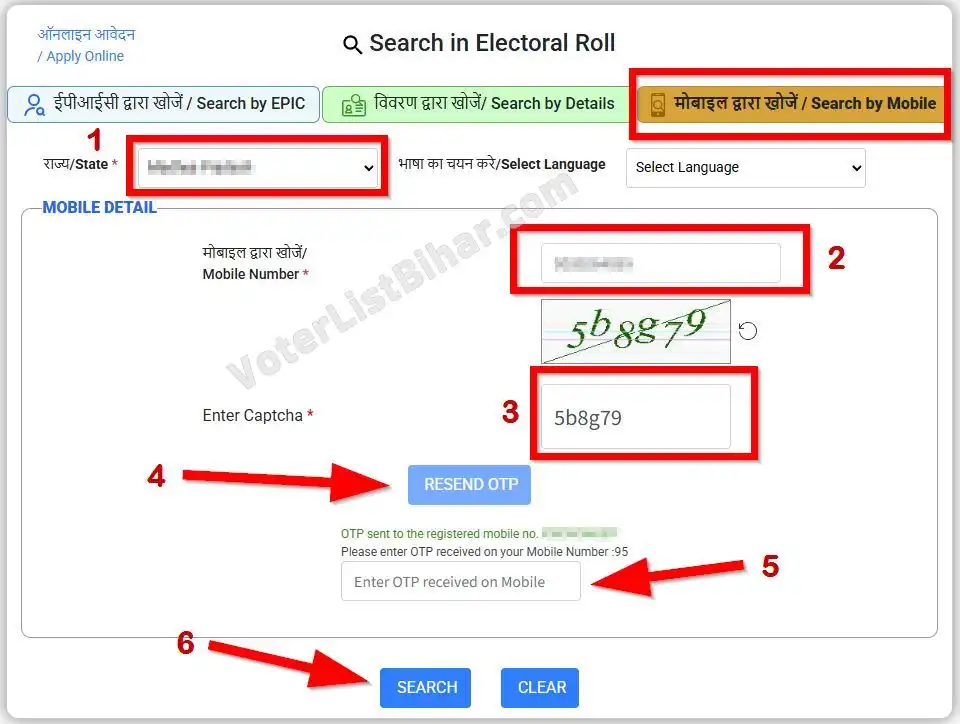
Step 2. Click on the 3rd option “मोबाइल द्वारा खोजें / Search by Mobile” After that select “राज्य/State” and select “भाषा का चयन करे/Select Language” now enter the mobile number that linked with voter card. Now fill in the captcha code and click on the “Search” button.
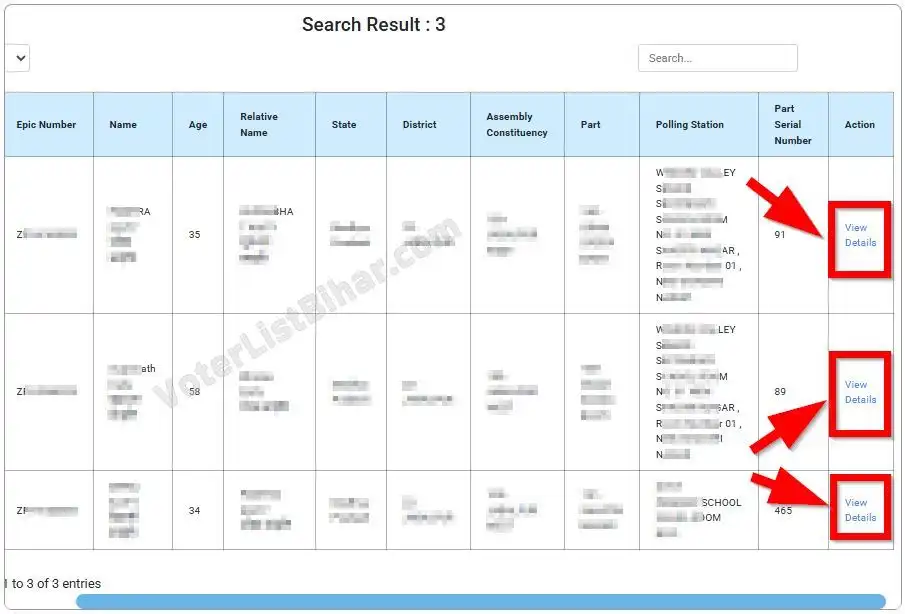
Step 3. The voter list will open at the bottom. If the same mobile number is used for multiple voter cards, then the search result will display all voter cards. Now, click on the “View Details” link to display complete voter details.
Step 4. The voter card details will open with the information of EPIC number, Polling Station, Part number and name, part serial number, polling date, and details of the election officers for that EPIC number.
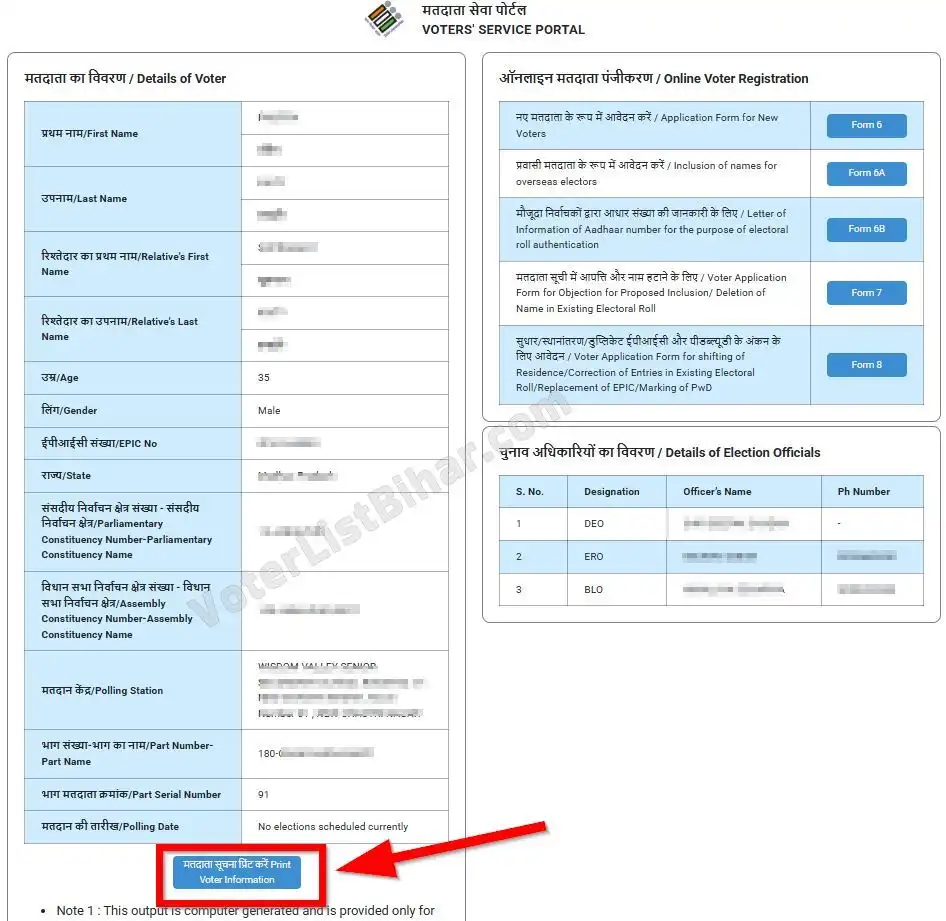
Step 5. To download E-Voter Card (E-Roll) click on the “Print Voter Information/मतदाता सूचना प्रिंट करें” button on the bottom, It will generate a PDF E-Voter Card for entered EPIC number.
Using the Mobile Number search to find a voter card is the best way to get a voter card quickly. It’s also a verified and time-saving path to get instant voter details.
This is the complete step-by-step guide to Bihar Voter Card Download 2025 with 3 Methods. Anyone can download their own e-Voter card from their home using these easy steps.